Platform · Visual mapping
Visual mapping that fails loudly, not silently.
The rules-based mapper turns JSON or XML into exactly what the destination expects. Rules are data you can review, previews run the pipeline’s own code, and a failing rule fails the exchange with its reason.
Source · JSON sample
Rules
Output · XML preview
Field rules
Values from a path, the document root, a fixed literal, a partner property or a global value set.
Transforms
upper, lower, trim, substring, replace, concat, round, multiply, add, formatDate and defaultIfEmpty.
Lookups and types
Replace values from a table with a fallback, then convert to string, number or boolean.
List rules
Walk arrays with filters, nest lists, add fixed entries, or make the whole output an array.
XML both ways
Attributes, mixed text, repeated elements and namespace declarations, read and written.
Build from a sample
Paste a target sample and let the editor add rules for fields not yet mapped.
The editor
Source, output and preview, side by side.
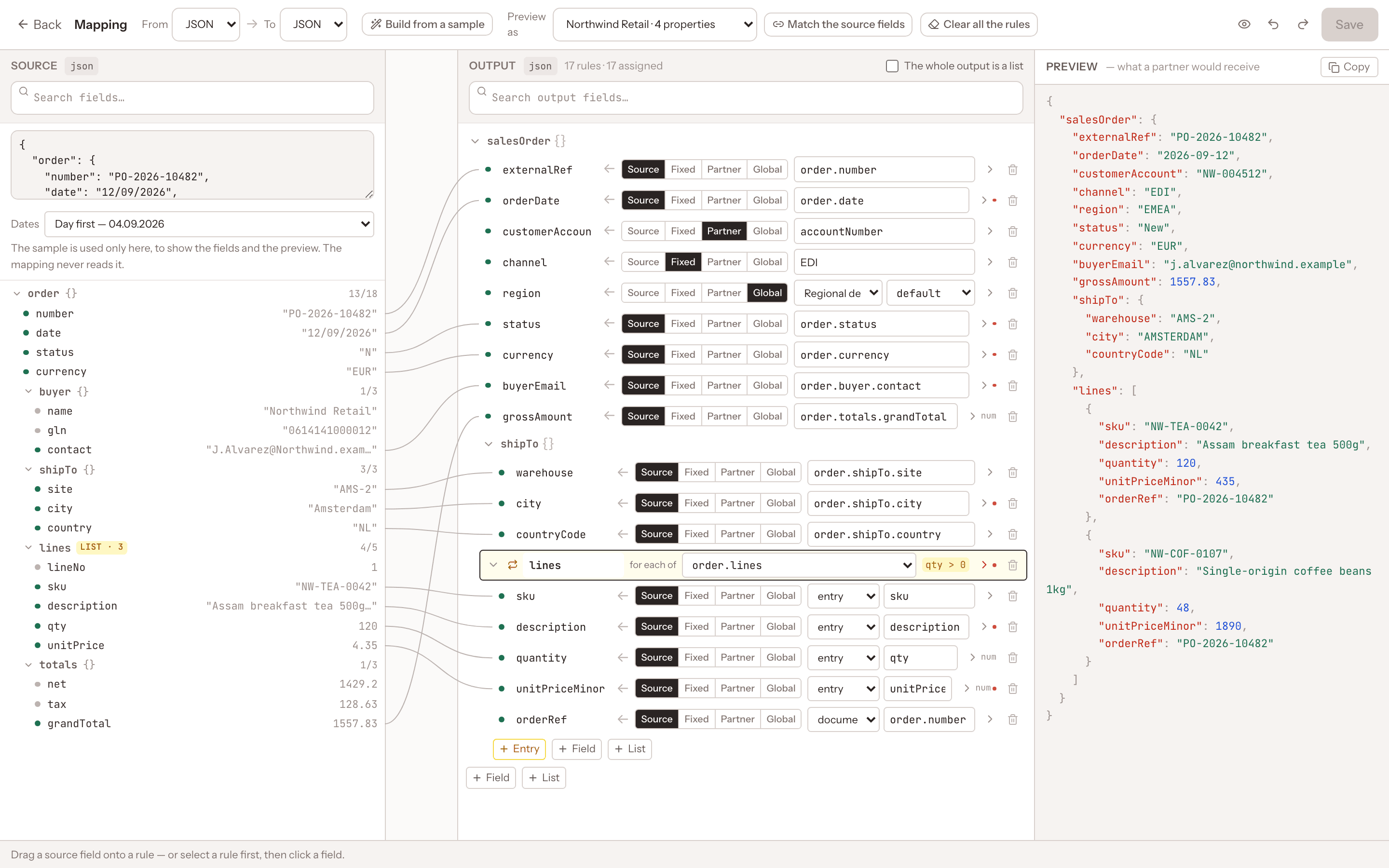
Paste a sample, drag a path onto a rule, and watch the server-side preview update. Failing rows are marked with the reason before anything is saved.
- Click or drag paths from the source
- Preview as a specific partner
- Save with Ctrl+S or Cmd+S
Rules are data
Reviewable, diffable, versionable.
Mapping rules are stored as JSON on the subscription. What the editor draws is exactly what the pipeline runs.
- Rules with a newer version are refused, never guessed
- Missing paths give null, not errors
- Decimals throughout, so no floating-point drift
{
  "version": 1,
  "sourceFormat": "json",
  "targetFormat": "json",
  "sourceDateOrder": "dayFirst",
  "fields": [
    { "target": ["reference"], "from": { "kind": "path", "path": "order.id" } },
    { "target": ["account"], "from": { "kind": "partner", "key": "accountNumber" } },
    { "target": ["status"], "from": { "kind": "path", "path": "order.status" },
      "lookup": { "table": { "N": "New", "S": "Shipped" }, "fallback": "Unknown" } }
  ],
  "lists": [
    { "over": "order.lines", "target": ["items"],
      "where": { "field": "qty", "operator": "greaterThan", "value": 0 },
      "fields": [ { "target": ["sku"], "from": { "kind": "path", "path": "sku" } } ] }
  ]
}
Precision by default
The details that stop bad data at the edge.
Mapping mistakes are expensive once they reach an ERP or a partner. The mapper refuses to guess.
| Situation | What the mapper does |
|---|---|
| A rule cannot be applied | The exchange fails, listing each failing target and the reason |
| An ambiguous date like 03/04/2026 | Refused unless the source date order is set to dayFirst or monthFirst |
| 100 × 1.16 | Exactly 116, because numbers are decimals throughout, never scientific notation |
| A boolean like "maybe" | The rule fails; only true/false, 1/0, yes/no, y/n are accepted |
| XML with a DTD or deeper than 64 levels | Refused |
Documentation
Written from the source code.
Every claim on this page links to documentation that is synced from the Bitween repository.
Explore the platform
More capabilities.
Put every integration on one governed pipeline.
Talk to the architects who build Bitween about your partners, systems and message volumes, or start from the docs and run it yourself today.